Pages

Showing posts with label mod. Show all posts

Darkest Dungeon Modding - Mission Maximum Level Restriction

Turns out it is very easy to mod the frustration-grind game Darkest Dungeon: The various .JSON and .DARKEST files are simply text files and are easy to read.

You can buy Darkest Dungeon with no-hassle setup and risk-free money-back guarantee from Good Old Games.

If you ever get a character up to level 3, you will discover that they are now locked out of the easier green missions. This is very irritating because you may well have a less-than-full four-team at that level, meaning that character will either have to bring a bunch of lower-level characters and possibly fail, or sit on the sidelines until you can gather a higher level crew.


Fortunately, you can simply edit C:\GOG Games\Darkest Dungeon\campaign\quest\quest.json as a text file and change this. Go to the end of the file and change the entries there into:

    "restriction": {
        "difficulty": {
            "comment": "This table restricts what level heroes can go on what level quest. ROWS are DIFFICULTY, COLs are QUEST LENGTH",
            "resolve_level_threshold_table": [
                99,
                99,
                99,
                99,
                99,
                99,
                99
            ]
        }
    }

This changes the level cutoff to level 99.

Turns out it is very easy to mod the frustration-grind game Darkest Dungeon: The various .JSON and .DARKEST files are simply text files and are easy to read.

You can buy Darkest Dungeon with no-hassle setup and risk-free money-back guarantee from Good Old Games.

If you ever get a character up to level 3, you will discover that they are now locked out of the easier green missions. This is very irritating because you may well have a less-than-full four-team at that level, meaning that character will either have to bring a bunch of lower-level characters and possibly fail, or sit on the sidelines until you can gather a higher level crew.


Fortunately, you can simply edit C:\GOG Games\Darkest Dungeon\campaign\quest\quest.json as a text file and change this. Go to the end of the file and change the entries there into:

    "restriction": {
        "difficulty": {
            "comment": "This table restricts what level heroes can go on what level quest. ROWS are DIFFICULTY, COLs are QUEST LENGTH",
            "resolve_level_threshold_table": [
                99,
                99,
                99,
                99,
                99,
                99,
                99
            ]
        }
    }

This changes the level cutoff to level 99.

reade more... Résuméabuiyad

Darkest Dungeon - Interacting with Curios

According to C:\GOG Games\Darkest Dungeon\localization\curios.string_table.xml, here are the iteractions and required items (if any) for curios in Darkest Dungeon. Note that in some cases not using and item will not necessarily result in a bad effect -- for example, if you use Holy Water on the Holy Fountain the result replaces the chance of getting loot from it. In some cases, interacting with the item locks in a negative result (e.g., if you use Holy Water on Occult Scrawlings).

You can buy Darkest Dungeon with no-hassle setup and risk-free money-back guarantee from Good Old Games.

party found a curio

Alchemy Table - no effect, loot, negative effect, loot (Medicinal Herbs) or light to 100 (Torch)
Altar of Light - none, buff, or buff (Holy Water)
Ancestor's Knapsack - none
Ancient Coffin - empty, loot, or quirk
Animalistic Shrine - loot (Pickaxe)
Bandit's Trapped Chest - trap or loot (skeleton key)
Brigand's Tent - loot
Barnacle Crusted Chest - empty, loot, bleed, or loot (Shovel)
Bas-Relief - quirk, or stress (Shovel)
Beast Carcass - empty, provisions, quirk, disease, or provisions (Medicinal Herbs)
Bone Altar - buff
Bookshelf - empty, quirk, stress, map, or old journal entry
Brackish Tide Pool - buff, disease, or heal (Antivenom)
Chirurgeon's Satchel - quest item
Confession Booth - loot, stress, purge negative trait, or stress heal (Holy Water)
Corrupted Altar - loot (Holy Water)
Crate - empty, or heirlooms
Decorative Urn - empty, loot, quirk, disease, loot (Holy Water) or negative trait (Guilty Conscience; Shovel)
Dinner Cart - empty, provisions, blight, disease, or provisions (Medicinal Herbs)
Discarded Pack - empty, loot, or map
Eerie Coral - empty, stress, stress heal, or purge negative effect (Medicinal Herbs)
Eerie Spiderweb - nothing, loot, quirk, or loot (Bandage)
Eldritch Altar - no effect, stress, purge illness, or remove one negative trait (Holy Water)
Fish Carcass - empty, provisions, trap, disease, or provisions (Medicinal Herbs)
Fish Idol - stress, or buff (Holy Water)
Foodstuff Crate - quest item
Giant Oyster - empty, loot, damage, effect (Dog Treat), or loot (Shovel)
Goal Strongbox - Holy Water
Heirloom Chest - empty, trap, or loot (Antivenom or Skeleton Key)
Holy Fountain - loot, heal, or buff (Holy Water)
Infected Corpse - loot (Antivenom)
Iron Maiden - empty, loot, quirk, disease, or loot (Medicinal Herbs)
Large Strongbox - loot
Left Luggage - trap, loot, or loot (Skeleton Key or Antivenom)
Locked Display Cabinet - trap, or loot (Skeleton Key or Shovel)
Locked Sarcophagus - trap, damaged loot (Shovel), or loot (Skeleton Key)
Locked Strongbox - empty, trap, damaged loot (Shovel) or loot (Skeleton Key)
Makeshift Dining Table - empty, provisions, blight, disease, or provisions (Medicinal Herbs)
Moonshine Barrel - empty, loot, quirk, blight, or buff (Medicinal Herbs)
Mummified Remains - empty, loot, disease, or loot (Bandage)
Occult Scrawlings - no effect, quirk, stress, or stress (Holy Water)
Old Tree - empty, loot, blight, or loot (Antivenom)
Pile of Bones - empty, loot, quirk, disease, or loot (Holy Water)
Pile of Scrolls - no effect, quirk, stress, map, or purge negative quirk (Torch)
Pristine Fountain - no effect, stress heal, or stress heal (Holy Water)
Protective Ward - use Lantern
Rack of Blades - empty, loot, bleed, or loot (Bandage)
Reliquary - quest item
Sack - empty, loot, or map
Sacrificial Stone - quirk, stress, purge negative quirk, purge negative quirk (Provisions) Food, or bleed (Torch)
Sarcophagus - empty, loot, or quirk
Sconce - nothing, or torch
Secret Stash - Skeleton Key
Shallow Grave - stress, disease, or loot (Shovel)
Shambler's Altar - summon Mash Shambler (Torch)
Shipment Crates - quest item
Ship's Figurehead - buff
Stack of Books - no effect, quirk, stress, old journal entry, or stress (Torch)
Suit of Armor - no effect, buff, or quirk
Traveller's Tent - no effect, loot, stress, or map
Troubling Effigy - no effect, quirk, stress, or buff (Holy Water)
Unlocked Strongbox - empty, trap, or loot

Interacting with curios is a basically a lottery of what curios you will encounter and therefore what supplies you will waste -- When you buy supplies, at the end of the mission any leftovers are sold back at approximately 10% of the buying price.
This sell-back doesn't make sense because you could simply hold supplies till your next expedition. To adjust sell-back prices, you can look at the .sell_gold_value entries in C:\GOG Games\Darkest Dungeon\inventory\inventory.darkest and adjust them.

If you adjust the buy and sell values to full AND you are also using our recommended values for more Camping in Darkest Dungeon, we recommend you adjust only the starting firewood values and leave everything else alone.

According to C:\GOG Games\Darkest Dungeon\localization\curios.string_table.xml, here are the iteractions and required items (if any) for curios in Darkest Dungeon. Note that in some cases not using and item will not necessarily result in a bad effect -- for example, if you use Holy Water on the Holy Fountain the result replaces the chance of getting loot from it. In some cases, interacting with the item locks in a negative result (e.g., if you use Holy Water on Occult Scrawlings).

You can buy Darkest Dungeon with no-hassle setup and risk-free money-back guarantee from Good Old Games.

party found a curio

Alchemy Table - no effect, loot, negative effect, loot (Medicinal Herbs) or light to 100 (Torch)
Altar of Light - none, buff, or buff (Holy Water)
Ancestor's Knapsack - none
Ancient Coffin - empty, loot, or quirk
Animalistic Shrine - loot (Pickaxe)
Bandit's Trapped Chest - trap or loot (skeleton key)
Brigand's Tent - loot
Barnacle Crusted Chest - empty, loot, bleed, or loot (Shovel)
Bas-Relief - quirk, or stress (Shovel)
Beast Carcass - empty, provisions, quirk, disease, or provisions (Medicinal Herbs)
Bone Altar - buff
Bookshelf - empty, quirk, stress, map, or old journal entry
Brackish Tide Pool - buff, disease, or heal (Antivenom)
Chirurgeon's Satchel - quest item
Confession Booth - loot, stress, purge negative trait, or stress heal (Holy Water)
Corrupted Altar - loot (Holy Water)
Crate - empty, or heirlooms
Decorative Urn - empty, loot, quirk, disease, loot (Holy Water) or negative trait (Guilty Conscience; Shovel)
Dinner Cart - empty, provisions, blight, disease, or provisions (Medicinal Herbs)
Discarded Pack - empty, loot, or map
Eerie Coral - empty, stress, stress heal, or purge negative effect (Medicinal Herbs)
Eerie Spiderweb - nothing, loot, quirk, or loot (Bandage)
Eldritch Altar - no effect, stress, purge illness, or remove one negative trait (Holy Water)
Fish Carcass - empty, provisions, trap, disease, or provisions (Medicinal Herbs)
Fish Idol - stress, or buff (Holy Water)
Foodstuff Crate - quest item
Giant Oyster - empty, loot, damage, effect (Dog Treat), or loot (Shovel)
Goal Strongbox - Holy Water
Heirloom Chest - empty, trap, or loot (Antivenom or Skeleton Key)
Holy Fountain - loot, heal, or buff (Holy Water)
Infected Corpse - loot (Antivenom)
Iron Maiden - empty, loot, quirk, disease, or loot (Medicinal Herbs)
Large Strongbox - loot
Left Luggage - trap, loot, or loot (Skeleton Key or Antivenom)
Locked Display Cabinet - trap, or loot (Skeleton Key or Shovel)
Locked Sarcophagus - trap, damaged loot (Shovel), or loot (Skeleton Key)
Locked Strongbox - empty, trap, damaged loot (Shovel) or loot (Skeleton Key)
Makeshift Dining Table - empty, provisions, blight, disease, or provisions (Medicinal Herbs)
Moonshine Barrel - empty, loot, quirk, blight, or buff (Medicinal Herbs)
Mummified Remains - empty, loot, disease, or loot (Bandage)
Occult Scrawlings - no effect, quirk, stress, or stress (Holy Water)
Old Tree - empty, loot, blight, or loot (Antivenom)
Pile of Bones - empty, loot, quirk, disease, or loot (Holy Water)
Pile of Scrolls - no effect, quirk, stress, map, or purge negative quirk (Torch)
Pristine Fountain - no effect, stress heal, or stress heal (Holy Water)
Protective Ward - use Lantern
Rack of Blades - empty, loot, bleed, or loot (Bandage)
Reliquary - quest item
Sack - empty, loot, or map
Sacrificial Stone - quirk, stress, purge negative quirk, purge negative quirk (Provisions) Food, or bleed (Torch)
Sarcophagus - empty, loot, or quirk
Sconce - nothing, or torch
Secret Stash - Skeleton Key
Shallow Grave - stress, disease, or loot (Shovel)
Shambler's Altar - summon Mash Shambler (Torch)
Shipment Crates - quest item
Ship's Figurehead - buff
Stack of Books - no effect, quirk, stress, old journal entry, or stress (Torch)
Suit of Armor - no effect, buff, or quirk
Traveller's Tent - no effect, loot, stress, or map
Troubling Effigy - no effect, quirk, stress, or buff (Holy Water)
Unlocked Strongbox - empty, trap, or loot

Interacting with curios is a basically a lottery of what curios you will encounter and therefore what supplies you will waste -- When you buy supplies, at the end of the mission any leftovers are sold back at approximately 10% of the buying price.
This sell-back doesn't make sense because you could simply hold supplies till your next expedition. To adjust sell-back prices, you can look at the .sell_gold_value entries in C:\GOG Games\Darkest Dungeon\inventory\inventory.darkest and adjust them.

If you adjust the buy and sell values to full AND you are also using our recommended values for more Camping in Darkest Dungeon, we recommend you adjust only the starting firewood values and leave everything else alone.

reade more... Résuméabuiyad
Darkest Dungeon modding - More Camping!

Turns out it is very easy to mod the frustration-grind game Darkest Dungeon: The various .JSON and .DARKEST files are simply text files and are easy to read.

You can buy Darkest Dungeon with no-hassle setup and risk-free money-back guarantee from Good Old Games.

One very simple adjustments you can make:


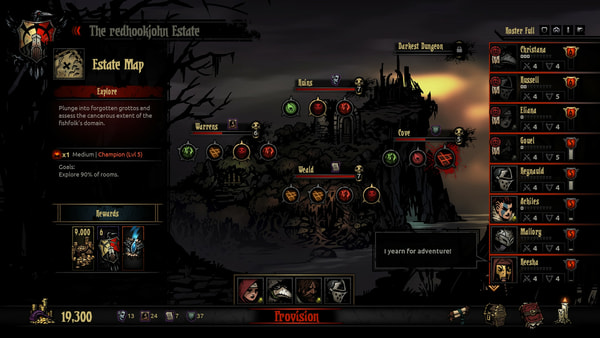
Camping - Option 1
The dungeon size determines the amount of firewood you get, and therefore how many times you can camp. The basic amount of resources you start with for each dungeon raid is in C:\GOG Games\Darkest Dungeon\campaign\provision\provision.json, right at the start of the file.
We recommend the following changes allow more rest during missions. Additional resources torches are also given to reflect that parties don't go out under-equipped on the basics of food and light.

    "raid_starting_length_inventory_item_lists":
    [
        [ ],
        [
            { "type": "supply", "id": "firewood", "amount": 2 },
            { "type": "provision", "id": "", "amount": 12 },
            { "type": "supply", "id": "shovel", "amount": 0 },
            { "type": "supply", "id": "antivenom", "amount": 0 },
            { "type": "supply", "id": "bandage", "amount": 0 },
            { "type": "supply", "id": "medicinal_herbs", "amount": 0 },
            { "type": "supply", "id": "skeleton_key", "amount": 0 },
            { "type": "supply", "id": "holy_water", "amount": 0 },
            { "type": "supply", "id": "torch", "amount": 8 }
        ],
        [
            { "type": "supply", "id": "firewood", "amount": 4 },
            { "type": "provision", "id": "", "amount": 24 },
            { "type": "supply", "id": "shovel", "amount": 0 },
            { "type": "supply", "id": "antivenom", "amount": 0 },
            { "type": "supply", "id": "bandage", "amount": 0 },
            { "type": "supply", "id": "medicinal_herbs", "amount": 0 },
            { "type": "supply", "id": "skeleton_key", "amount": 0 },
            { "type": "supply", "id": "holy_water", "amount": 0 },
            { "type": "supply", "id": "torch", "amount": 16 }
        ],
        [
            { "type": "supply", "id": "firewood", "amount": 6 },
            { "type": "provision", "id": "", "amount": 36 },
            { "type": "supply", "id": "shovel", "amount": 0 },
            { "type": "supply", "id": "antivenom", "amount": 0 },
            { "type": "supply", "id": "bandage", "amount": 0 },
            { "type": "supply", "id": "medicinal_herbs", "amount": 0 },
            { "type": "supply", "id": "skeleton_key", "amount": 0 },
            { "type": "supply", "id": "holy_water", "amount": 0 },
            { "type": "supply", "id": "torch", "amount": 24 }
        ],
        [
            { "type": "supply", "id": "firewood", "amount": 8 },
            { "type": "provision", "id": "", "amount": 48 },
            { "type": "supply", "id": "shovel", "amount": 0 },
            { "type": "supply", "id": "antivenom", "amount": 0 },
            { "type": "supply", "id": "bandage", "amount": 0 },
            { "type": "supply", "id": "medicinal_herbs", "amount": 0 },
            { "type": "supply", "id": "skeleton_key", "amount": 0 },
            { "type": "supply", "id": "holy_water", "amount": 0 },
            { "type": "supply", "id": "torch", "amount": 32 }
        ]
    ],

To actually make these changes useful, you also need to adjust your inventory limits. Edit C:\GOG Games\Darkest Dungeon\inventory\inventory.darkest and change .use_stack_limits true to .use_stack_limits false, except for Trinkets. You may also want to give yourself 8 additional inventory slots by changing .type "raid" .max_slots 16 to .type "raid" .max_slots 24. A third row of slots will be just barely accessible under the second row.

By giving out more opportunities to camp, you also let parties recover more often and reduce Stress through their camping skills. The drawback is in the opportunity to be ambushed after camping, which could very well undo all the gains.

Camping - Option 2
Another option is to make firewood available for puchase. This way you can adjust how much firewood you want to take. To do this, you need to edit provision.json to have firewood available. Find the lines in the section default_store_inventory_item_lists and duplicate the lines for shovels. Then edit your duplicate lines to change the word shovel into firewood. For example:

    "default_store_inventory_item_lists":
    [
        [ ],
        [
            { "type": "provision", "id": "", "amount": 18 },
            { "type": "supply", "id": "shovel", "amount": 4 },
            { "type": "supply", "id": "firewood", "amount": 4 },
            { "type": "supply", "id": "antivenom", "amount": 6 },
            { "type": "supply", "id": "bandage", "amount": 6 },
            { "type": "supply", "id": "medicinal_herbs", "amount": 6 },
            { "type": "supply", "id": "skeleton_key", "amount": 6 },
            { "type": "supply", "id": "holy_water", "amount": 6 },
            { "type": "supply", "id": "torch", "amount": 18 }
        ],

If you want, you can leave the price of firewood at 0, or you can edit C:\GOG Games\Darkest Dungeon\inventory\inventory.darkest where you can find the buy and sell value of firewood in the bottom section. We recommend setting it to be the same as the prices for shovels.

Turns out it is very easy to mod the frustration-grind game Darkest Dungeon: The various .JSON and .DARKEST files are simply text files and are easy to read.

You can buy Darkest Dungeon with no-hassle setup and risk-free money-back guarantee from Good Old Games.

One very simple adjustments you can make:


Camping - Option 1
The dungeon size determines the amount of firewood you get, and therefore how many times you can camp. The basic amount of resources you start with for each dungeon raid is in C:\GOG Games\Darkest Dungeon\campaign\provision\provision.json, right at the start of the file.
We recommend the following changes allow more rest during missions. Additional resources torches are also given to reflect that parties don't go out under-equipped on the basics of food and light.

    "raid_starting_length_inventory_item_lists":
    [
        [ ],
        [
            { "type": "supply", "id": "firewood", "amount": 2 },
            { "type": "provision", "id": "", "amount": 12 },
            { "type": "supply", "id": "shovel", "amount": 0 },
            { "type": "supply", "id": "antivenom", "amount": 0 },
            { "type": "supply", "id": "bandage", "amount": 0 },
            { "type": "supply", "id": "medicinal_herbs", "amount": 0 },
            { "type": "supply", "id": "skeleton_key", "amount": 0 },
            { "type": "supply", "id": "holy_water", "amount": 0 },
            { "type": "supply", "id": "torch", "amount": 8 }
        ],
        [
            { "type": "supply", "id": "firewood", "amount": 4 },
            { "type": "provision", "id": "", "amount": 24 },
            { "type": "supply", "id": "shovel", "amount": 0 },
            { "type": "supply", "id": "antivenom", "amount": 0 },
            { "type": "supply", "id": "bandage", "amount": 0 },
            { "type": "supply", "id": "medicinal_herbs", "amount": 0 },
            { "type": "supply", "id": "skeleton_key", "amount": 0 },
            { "type": "supply", "id": "holy_water", "amount": 0 },
            { "type": "supply", "id": "torch", "amount": 16 }
        ],
        [
            { "type": "supply", "id": "firewood", "amount": 6 },
            { "type": "provision", "id": "", "amount": 36 },
            { "type": "supply", "id": "shovel", "amount": 0 },
            { "type": "supply", "id": "antivenom", "amount": 0 },
            { "type": "supply", "id": "bandage", "amount": 0 },
            { "type": "supply", "id": "medicinal_herbs", "amount": 0 },
            { "type": "supply", "id": "skeleton_key", "amount": 0 },
            { "type": "supply", "id": "holy_water", "amount": 0 },
            { "type": "supply", "id": "torch", "amount": 24 }
        ],
        [
            { "type": "supply", "id": "firewood", "amount": 8 },
            { "type": "provision", "id": "", "amount": 48 },
            { "type": "supply", "id": "shovel", "amount": 0 },
            { "type": "supply", "id": "antivenom", "amount": 0 },
            { "type": "supply", "id": "bandage", "amount": 0 },
            { "type": "supply", "id": "medicinal_herbs", "amount": 0 },
            { "type": "supply", "id": "skeleton_key", "amount": 0 },
            { "type": "supply", "id": "holy_water", "amount": 0 },
            { "type": "supply", "id": "torch", "amount": 32 }
        ]
    ],

To actually make these changes useful, you also need to adjust your inventory limits. Edit C:\GOG Games\Darkest Dungeon\inventory\inventory.darkest and change .use_stack_limits true to .use_stack_limits false, except for Trinkets. You may also want to give yourself 8 additional inventory slots by changing .type "raid" .max_slots 16 to .type "raid" .max_slots 24. A third row of slots will be just barely accessible under the second row.

By giving out more opportunities to camp, you also let parties recover more often and reduce Stress through their camping skills. The drawback is in the opportunity to be ambushed after camping, which could very well undo all the gains.

Camping - Option 2
Another option is to make firewood available for puchase. This way you can adjust how much firewood you want to take. To do this, you need to edit provision.json to have firewood available. Find the lines in the section default_store_inventory_item_lists and duplicate the lines for shovels. Then edit your duplicate lines to change the word shovel into firewood. For example:

    "default_store_inventory_item_lists":
    [
        [ ],
        [
            { "type": "provision", "id": "", "amount": 18 },
            { "type": "supply", "id": "shovel", "amount": 4 },
            { "type": "supply", "id": "firewood", "amount": 4 },
            { "type": "supply", "id": "antivenom", "amount": 6 },
            { "type": "supply", "id": "bandage", "amount": 6 },
            { "type": "supply", "id": "medicinal_herbs", "amount": 6 },
            { "type": "supply", "id": "skeleton_key", "amount": 6 },
            { "type": "supply", "id": "holy_water", "amount": 6 },
            { "type": "supply", "id": "torch", "amount": 18 }
        ],

If you want, you can leave the price of firewood at 0, or you can edit C:\GOG Games\Darkest Dungeon\inventory\inventory.darkest where you can find the buy and sell value of firewood in the bottom section. We recommend setting it to be the same as the prices for shovels.

reade more... Résuméabuiyad